Internationalization: Best DX-Friendly Configuration for Your Next Project
A guide to setting up internationalization in your projects with a focus on developer experience, using modern tools and practices.
Since you are here to learn the best way, I assume you know what internationalization (i18n) is and why it is important.
Why most of internationalization solutions sucks
-
Too much abstraction
- Most of libraries abstract away the literal strings into JSON or other formats. This makes components much harder to read and especially to maintain.
- Most of time you have to create a
namefor each string in your application. The 2 most difficult things in programming are naming things and cache invalidation. So, naming each string is a nightmare.
import { useTranslations } from "next-intl"; export default function UserProfile({ user }) { const t = useTranslations("UserProfile"); return ( <section> <h1>{t("title", { firstName: user.firstName })}</h1> <p>{t("membership", { memberSince: user.memberSince })}</p> <p>{t("followers", { count: user.numFollowers })}</p> </section> ); }- No Direct link between the code and the rendered string. Which makes it hard to find the actual strings are being stored.
Can you quickly see what these tags supposed to render? Were they just greetings, important information, or something else?
-
Too much manual work to setup and maintain
- In most libraries you must manually create translation files, extract strings, paste them in translation files.
- Internationalization must always comes after the main development is done with the primary language. But if you have to change so much more to get to the internationalized version, it will be a pain to maintain.
Before adding i18n
export default function UserProfile({ user }) {
    return (
        <section>
        <h1>{user.firstName}'s profile</h1>
        <p>Member since {user.memberSince}</p>
        <p>{user.numFollowers} followers</p>
        </section>
    );
}
After adding i18n
import { useTranslations } from "next-intl"; export default function UserProfile({ user }) { const t = useTranslations("UserProfile"); return ( <section> <h1>{t("title", { firstName: user.firstName })}</h1> <p>{t("membership", { memberSince: user.memberSince })}</p> <p>{t("followers", { count: user.numFollowers })}</p> </section> ); }{ "UserProfile": { "title": "{firstName}'s profile", "membership": "Member since {memberSince, date, short}", "followers": "{count, plural, =0 {No followers yet} =1 {One follower} other {# followers} }" } }Spot the difference? Lol. Imagine doing this for hundreds of components and thousands of strings.
These way of doing i18n is tedious and lots of unnecessary work.
So what's the solution?
I recently discovered a library called LinguiJS which solves most of these problems.
This is one component I internationalized using LinguiJS.
Before
const ApproveCommunityRequest = ({ data }) => {
  return (
    <DialogContent>
      <div className="space-y-4">
        <DialogHeader>
          <DialogTitle>Approve request of {data.request.name}</DialogTitle>
        </DialogHeader>
        <DialogDescription>
          This will approve the request from {data.request.name}. They will have
          access to platform as communities. We will notify them by email.
        </DialogDescription>

        <DialogFooter>
          <DialogClose asChild>
            <Button variant="outline">Cancel</Button>
          </DialogClose>
          <Button type="submit" onClick={...}>
            Approve Request
          </Button>
        </DialogFooter>
      </div>
    </DialogContent>
  );
};
After
import { Trans } from "@lingui/react/macro";

const ApproveCommunityRequest = ({ data }) => {
  return (
    <DialogContent>
      <div className="space-y-4">
        <DialogHeader>
          <DialogTitle>
            <Trans>Approve request of {data.request.name}</Trans>
          </DialogTitle>
        </DialogHeader>
        <DialogDescription>
          <Trans>
            This will approve the request from {data.request.name}. They will
            have access to platform as communities. We will notify them by
            email.
          </Trans>
        </DialogDescription>

        <DialogFooter>
          <DialogClose asChild>
            <Button variant="outline">
              <Trans>Cancel</Trans>
            </Button>
          </DialogClose>
          <Button type="submit" onClick={...}>
            <Trans>Approve Request</Trans>
          </Button>
        </DialogFooter>
      </div>
    </DialogContent>
  );
};
Difference?, it's nothing. Just wrapping the strings with <Trans> component. In fact I used AI for that.
Do you belive If I tell you now this works for all the configured languages? All we need to do is add the translations for each language once and we are done. (Trust me it's even simpler)
Benefits of using LinguiJS
-
Minimal code changes to internationalize your components.
-
No need to create translation keys or files manually.
-
Uses standard formats like
.pofiles for translations. -
Supports pluralization, gender, and other advanced i18n features.
-
AI tools can be directly used to generate translations from
.pofiles. -
Really effective when adding i18n to existing projects.
I added i18n to an existing NextJS project with 100+ components in less than a day everything was driven by AI. All I did was reviewing those codes changes and adding translations to
.pofiles was also done through AI.
How does LinguiJS work?
Simple answer is Macros. LinguiJS uses Macros to transform the code at build time. So you don't have to pay any runtime cost for internationalization.
When you run npx lingui extract command, it scans your codebase for all the strings and creates a messages.po file which contains all the strings in your codebase.
Then you can use npx lingui compile command to compile the translations into a format that can be used by your application.
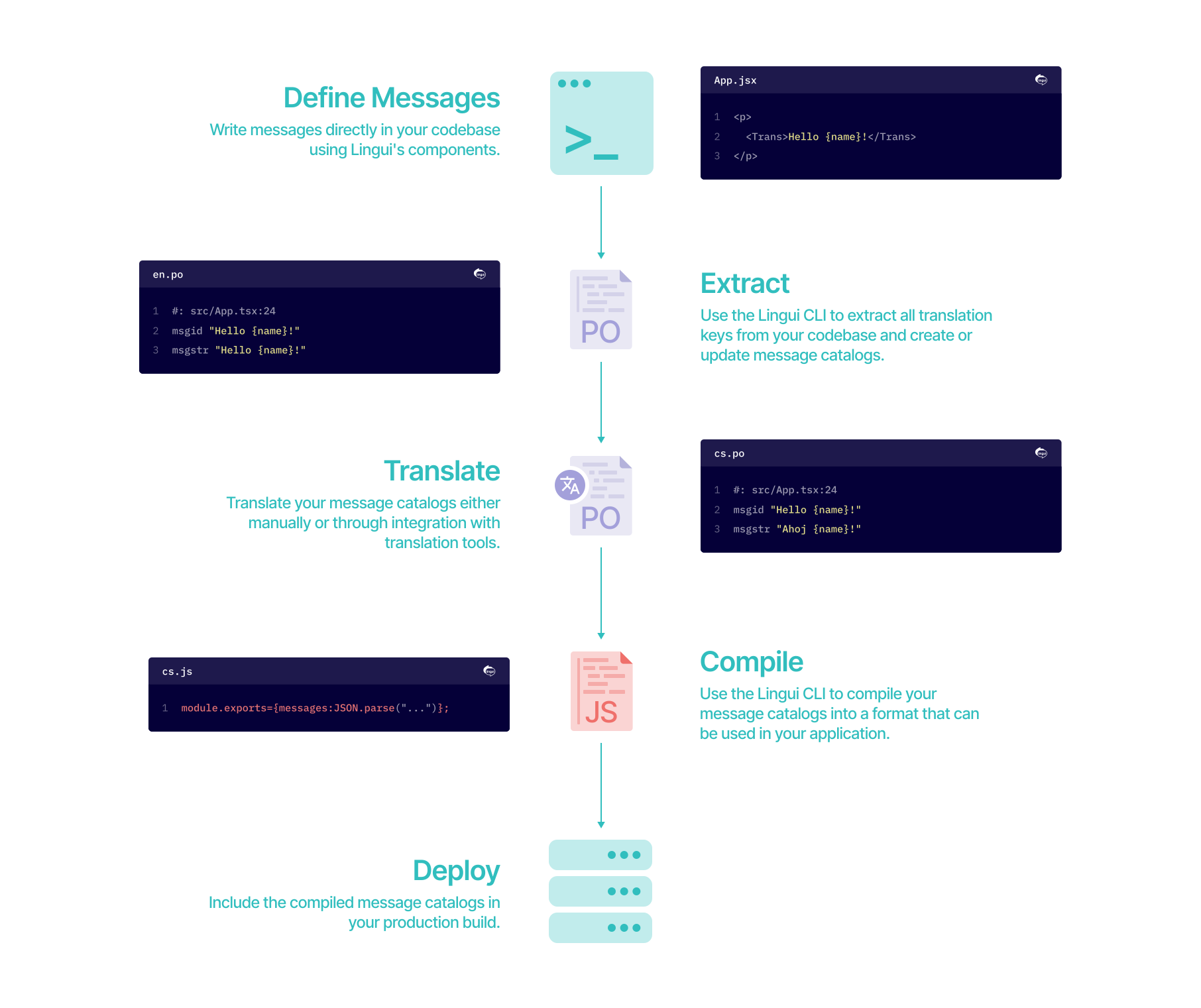
Setting up LinguiJS in NextJS with TypeScript
Folder Structure (refer to this if you get lost somewhere)
. (Project Root)
├── lingui.config.ts
├── next.config.ts
├── package.json
├── src
│   ├── app
│   ├── assets
│   ├── components
│   ├── hooks
│   │   └── use-translation.ts
│   ├── i18n
│   │   ├── en # these are auto generated by lingui
│   │   │   ├── messages.js
│   │   │   └── messages.po
│   │   └── fr
│   │       ├── messages.js
│   │       └── messages.po
│   ├── lib
│   │   ├── actions
│   │   │   ├── locale.ts
│   │   ├── i18n-server.ts
│   │   ├── i18n.ts
│   ├── middleware.ts
│   ├── providers
│   │   ├── i18n-provider.tsx
└── tsconfig.json
We will be using Nextjs 15 with React 19 and LinguiJS 5 for this setup.
Install dependencies
npm install --save-dev @lingui/cli @lingui/swc-plugin npm install --save @lingui/core @lingui/macro @lingui/reactAdd Configuration to NextJS
In your next.config.js file, add the following configuration to enable the Lingui SWC plugin:
import type { NextConfig } from "next";

const nextConfig: NextConfig = {
    // add this part
    experimental: {
        swcPlugins: [["@lingui/swc-plugin", {}]],
    },
};

export default nextConfig;
Setup basic configuration
Create a lingui.config.ts file in the root of your project with the following content:
import type { LinguiConfig } from "@lingui/conf";

const config: LinguiConfig = {
    locales: ["en", "fr"],
    sourceLocale: "en",
    catalogs: [
        {
            path: "<rootDir>/src/i18n/{locale}/messages",
            include: ["src"],
        },
    ],
    format: "po",
};

export default config;
Make sure to create the i18n folder inside src folder.
We are adding 2 languages here, English and French. You can add more languages as you want. Each locale should be a valid BCP-47 code
Create helper files inside src/lib folder
import { i18n, type I18n } from "@lingui/core";

export const locales = {
    en: "English",
    fr: "Français",
} as const;

export type LocaleCode = keyof typeof locales;

export const defaultLocale: LocaleCode = "en";

/**
* Initialize i18n instance with messages for the given locale
*/
export async function loadCatalog(locale: LocaleCode): Promise<I18n> {
    const { messages } = await import(`~/i18n/${locale}/messages`);

    i18n.loadAndActivate({ locale, messages });
    return i18n;
}

/**
* Get all available locale codes
*/
export function getLocales(): LocaleCode[] {
    return Object.keys(locales) as LocaleCode[];
}

/**
* Check if a locale code is valid
*/
export function isValidLocale(locale: string): locale is LocaleCode {
    return locale in locales;
}

export { i18n };
import "server-only";

import { i18n } from "@lingui/core";
import type { LocaleCode } from "./i18n";

let currentLocale: LocaleCode | null = null;

/**
* Initialize i18n for server components
* This should be called in the root layout before rendering
*/
export async function setI18nInstance(locale: LocaleCode) {
    const { messages } = await import(`~/i18n/${locale}/messages`);
    i18n.loadAndActivate({ locale, messages });
    currentLocale = locale;
}

/**
* Get the current server-side locale
*/
export function getCurrentLocale(): LocaleCode {
    if (!currentLocale) {
        throw new Error("i18n not initialized. Call setI18nInstance() in your root layout first.");
    }
    return currentLocale;
}

/**
* Access i18n instance in server components
* Use this for translations in Server Components
*/
export { i18n };"use server";
import { cookies } from "next/headers";
import { isValidLocale, type LocaleCode } from "~/lib/i18n";
/**
* Server action to set the user's locale preference
* This will set a cookie that persists across sessions
*/
export async function setLocale(locale: LocaleCode) {
if (!isValidLocale(locale)) {
throw new Error(`Invalid locale: ${locale}`);
}
const cookieStore = await cookies();
cookieStore.set("NEXT_LOCALE", locale, {
path: "/",
maxAge: 60 * 60 * 24 * 365, // 1 year
sameSite: "lax",
});
return { success: true, locale };
}
/**
* Get the current locale from cookies
*/
export async function getLocale(): Promise<LocaleCode> {
const cookieStore = await cookies();
const locale = cookieStore.get("NEXT_LOCALE")?.value;
if (locale && isValidLocale(locale)) {
return locale;
}
return "en";
}Setup middleware.ts for locale detection
Create a middleware.ts file in the src folder with the following content:
import { NextResponse } from "next/server";
import type { NextRequest } from "next/server";
import { defaultLocale, isValidLocale, type LocaleCode } from "~/lib/i18n";

/**
* Get the preferred locale from the request
* Priority: Cookie > Accept-Language header > Default
*/
function getLocale(request: NextRequest): LocaleCode {
    // 1. Check cookie
    const cookieLocale = request.cookies.get("NEXT_LOCALE")?.value;
    if (cookieLocale && isValidLocale(cookieLocale)) {
        return cookieLocale;
    }

    // 2. Check Accept-Language header
    const acceptLanguage = request.headers.get("Accept-Language");
    if (acceptLanguage) {
        const languages = acceptLanguage.split(",").map((lang) => lang.split(";")[0].trim().toLowerCase());

        for (const lang of languages) {
            // Check exact match (e.g., "fr")
            if (isValidLocale(lang)) {
                return lang;
            }
            // Check language prefix (e.g., "fr-FR" -> "fr")
            const prefix = lang.split("-")[0];
            if (prefix && isValidLocale(prefix)) {
                return prefix;
            }
        }
    }

    // 3. Default locale
    return defaultLocale;
}

export function middleware(request: NextRequest) {
    const locale = getLocale(request);
    const response = NextResponse.next();

    // Add custom headers
    response.headers.set("x-current-path", request.nextUrl.pathname);
    response.headers.set("x-locale", locale);

    // Set locale cookie if not present or different
    const currentCookie = request.cookies.get("NEXT_LOCALE")?.value;
    if (currentCookie !== locale) {
        response.cookies.set("NEXT_LOCALE", locale, {
            path: "/",
            maxAge: 60 * 60 * 24 * 365, // 1 year
            sameSite: "lax",
        });
    }

    return response;
}

export const config = {
    matcher: ["/((?!api|_next/static|_next/image|favicon.ico).*)"],
};
Create i18n provider for Client Components
"use client";

import { i18n } from "@lingui/core";
import { I18nProvider as LinguiProvider } from "@lingui/react";
import type { ReactNode } from "react";
import { useEffect, useRef } from "react";
import type { LocaleCode } from "~/lib/i18n";

interface I18nProviderProps {
    children: ReactNode;
    locale: LocaleCode;
    messages: Record<string, string>;
}

/**
* Client-side i18n provider that wraps the app with Lingui's I18nProvider
* Messages are pre-loaded on the server and passed as props
*/
export function I18nProvider({ children, locale, messages }: I18nProviderProps) {
    const isActivated = useRef(false);

    // Activate i18n synchronously on first render
    if (!isActivated.current) {
        i18n.loadAndActivate({ locale, messages });
        isActivated.current = true;
    }

    // Update when locale changes
    useEffect(() => {
        if (i18n.locale !== locale) {
            i18n.loadAndActivate({ locale, messages });
        }
    }, [locale, messages]);

    return <LinguiProvider i18n={i18n}>{children}</LinguiProvider>;
}
Create a custom hook for translations in Client Components
"use client";

import type { MessageDescriptor } from "@lingui/core";
import { useLingui as useBaseLingui } from "@lingui/react";

/**
* Custom hook that wraps Lingui's useLingui with additional utilities
*
* @example
* ```tsx
* import { useTranslation } from "@/hooks/use-translation";
*
* export function MyComponent() {
*   const { t, _ } = useTranslation();
*
*   return (
*     <button aria-label={_(msg`Click to continue`)}>
*       {t(msg`Continue`)}
*     </button>
*   );
* }
* ```
*/
export function useTranslation() {
    const lingui = useBaseLingui();

    return {
        /**
         * Translate a message descriptor to a string
         * Shorthand for lingui._.
         */
        t: (descriptor: MessageDescriptor) => lingui._(descriptor),
        /**
         * Translate a message descriptor to a string (alias)
         * Direct access to lingui._ for consistency
         */
        _: lingui._,
        /**
         * The i18n instance for advanced usage
         */
        i18n: lingui.i18n,
    };
}
Update your root layout to setup i18n
import { cookies, headers } from "next/headers";
import { defaultLocale, isValidLocale, type LocaleCode } from "~/lib/i18n";
import { setI18nInstance } from "~/lib/i18n-server";
import { I18nProvider } from "~/providers/i18n-provider";

export default async function RootLayout({ children }) {
    // Get locale from cookie or header
    const cookieStore = await cookies();
    const headersList = await headers();
    const cookieLocale = cookieStore.get("NEXT_LOCALE")?.value;
    const headerLocale = headersList.get("x-locale");

    const locale: LocaleCode =
        (cookieLocale && isValidLocale(cookieLocale) ? cookieLocale : null) ??
        (headerLocale && isValidLocale(headerLocale) ? headerLocale : null) ??
        defaultLocale;

    // Load messages for server components and client hydration
    const { messages } = await import(`~/i18n/${locale}/messages`);
    await setI18nInstance(locale);

    return (
        <html lang={locale} suppressHydrationWarning>
            <body>
                {/* ...  */}
                <I18nProvider locale={locale} messages={messages}>
                   {children}
                </I18nProvider>
                {/* .... */}
            </body>
        </html>
    );
}
Extract and compile messages
Now you run this command to see if everything is working fine.
npx lingui extractThis will create/update the messages.po files in each locale folder inside src/i18n.
After adding translations to the .po files, run:
npx lingui compileThis will generate the messages.js files that are used at runtime.
Simple component to change locale
"use client";

import { useLingui } from "@lingui/react/macro";
import { CheckIcon, Globe } from "lucide-react";
import { useRouter } from "next/navigation";
import { useTransition } from "react";
import { toast } from "sonner";
import { DropdownMenu, DropdownMenuContent, DropdownMenuItem, DropdownMenuTrigger } from "~/components/ui/dropdown-menu";
import { setLocale } from "~/lib/actions/locale";
import { locales, type LocaleCode } from "~/lib/i18n";

/**
* Locale switcher component
* Allows users to change their language preference
*/
export function LocaleSwitcher({}) {
    const [isPending, startTransition] = useTransition();
    const router = useRouter();
    const { i18n } = useLingui();

    const currentLocale = i18n.locale as LocaleCode;

    const handleLocaleChange = (locale: LocaleCode) => {
        startTransition(async () => {
            await setLocale(locale);
            toast.success("Language changed successfully to " + locales[locale]);
            // Refresh the page to apply the new locale
            router.refresh();
        });
    };

    //   customize this to any design system you use
    //   this one uses shadcn ui components
    return (
        <DropdownMenu>
            <DropdownMenuTrigger asChild>
                <DropdownMenuItem disabled={isPending}>
                <Globe className="h-4 w-4" />
                    Change Language
                </DropdownMenuItem>
            </DropdownMenuTrigger>
            <DropdownMenuContent align="end">
                {Object.entries(locales).map(([code, name]) => (
                    <DropdownMenuItem
                        key={code}
                        onClick={() => handleLocaleChange(code as LocaleCode)}
                        disabled={isPending || code === currentLocale}
                    >
                        {name}
                        {code === currentLocale && <CheckIcon />}
                    </DropdownMenuItem>
                ))}
            </DropdownMenuContent>
        </DropdownMenu>
    );
}
Job Done!
Add Translations for secondary languages
Now you can open the messages.po files inside each locale folder and add the translations for each string.
Bonus: You can use AI tools to generate translations for you. Just make sure to review them before using in production.